ChartMystic
  • How it works
  • Products
  • Live demo
  • Results
  • Pricing
  • Docs
Log inSign up
  • How it works
  • Products
  • Live demo
  • Results
  • Pricing
  • Docs
  • Log in

Documentation

Artemis Pro

InstallationOverviewHow Artemis Pro ThinksReading The ChartTrend EngineSignal ReferenceLiquidity LinesLiquidity GrabsSession BoxesHTF LevelsHTF CandlesHTF Info TableBacktesting And Data WindowSupported Markets And ChartsSettings ReferenceFAQGlossary

Scribe Studio

OverviewAsk for a StrategyPerformanceTrade AnalysisCodeTweaking Your StrategyTransfer to TradingViewThe Strategy LibraryHistory & Saved StrategiesFAQGlossary
ChartMystic
Documentation/Artemis Pro/Settings Reference

Settings Reference

Every Artemis Pro input, grouped exactly as it appears in the settings dialog, with its shipped default and purpose.

This page lists every Artemis Pro input, grouped exactly as it appears in the indicator's settings dialog, along with its shipped default and purpose. Most behavioral inputs also carry a tooltip inside the indicator itself, so you can usually look up a setting without leaving the chart.

Getting back to a known state

If you have changed too much, use TradingView's "Reset settings" in the settings dialog — the defaults below are the shipped configuration.

1. Key Signals

The pattern engine's switchboard: one master switch for the text labels, one toggle per pattern, and one color per pattern. Turning a pattern off removes its labels and its candle coloring; the trend engine keeps running either way.

Pattern set update

The former Key Reversal (R) and Kicker (K) inputs no longer exist; the Hikkake (HK) input remains. Three White Soldiers (3WS) and Three Black Crows (3BC) form the new paired pattern family. The table below is the current Key Signals group.

InputDefaultEffect
Show Signal Labels?onMaster switch for all pattern text labels
Show Stars (MS/ES)?onMorning Star and Evening Star detection
Show TLS?onThree-Line Strike detection
PreviousSupported Markets And ChartsNextFAQ

Need help?

Show Hikkake (HK)?
on
Hikkake (inside-bar trap) detection
Show Three White Soldiers (3WS)?onThree White Soldiers detection
Show Three Black Crows (3BC)?onThree Black Crows detection
Show Piercing Line (PL)?onPiercing Line detection
Show Three Outside Down (TOD)?onThree Outside Down detection
Show Three Outside Up (TOU)?onThree Outside Up detection
Show Bump & Run Reversal Bottom (BnR)?onBump and Run Reversal Bottom detection
Morning StarCyan #00BCD4Candle and label color for MS
Evening StarOrange #FF9100Candle and label color for ES
TLSPink #F50057Candle and label color for the bearish Three-Line Strike. The bullish strike always paints white for legibility and is not configurable
Hikkake TrapYellow #FFFF00Candle and label color for HK
Three White SoldiersElectric Blue #2962FFCandle and label color for 3WS
Three Black CrowsPurple #D500F9Candle and label color for 3BC
Piercing LineEmerald #00E676Candle and label color for PL
Three Outside DownDeep Orange #FF6E40Candle and label color for TOD
Three Outside UpIndigo #448AFFCandle and label color for TOU
Bump & Run Reversal BottomMint #69F0AECandle and label color for BnR

See the Signal Reference for what each pattern means and when it fires.

There is no breakout group anymore

The strong-breakout detection that used to live in "Structure & Breakouts" survives internally as a trend-flip trigger with fixed thresholds (body at least 60 percent, close extending at least 0.15 ATR beyond the prior extreme) — it paints no special color, prints no label, and has no settings. See Trend Engine.

2. Standard Trend

The trend engine that colors every candle. Details in Trend Engine.

InputDefaultEffect
Color Trend Candles?onMaster switch for trend candle painting
Trend Speed10SSL channel period; lower switches faster, higher is more stable
Trend UpNeon Green #39FF14Candle color in an uptrend
Trend DownNeon Red #FF1A1ACandle color in a downtrend
Indecisive Candle Fill?onContrasting body fill for candles with a body below 30 percent of the range
Indecisive Body (Bull)Black #000000Body fill for indecisive candles in an uptrend
Indecisive Body (Bear)Gray #B2B5BEBody fill for indecisive candles in a downtrend

3. Swing Lines

The liquidity level module. Details in Liquidity Lines.

InputDefaultEffect
Active Swing Lines?onMaster switch for swing-based liquidity lines
Bars Left10Pivot detection width to the left; more bars means only larger swings qualify
Bars Right3Pivot confirmation width to the right; more bars means later but more reliable detection
Res LinesRed #FF3B30Color for swing-high (resistance) lines
Sup LinesGreen #00FF6AColor for swing-low (support) lines
Width2Line width (1 to 4)
Extend Until Filled?onLines extend to the right until price mitigates them
Hide Filled?offRemove mitigated lines entirely instead of freezing them in place
Max Age (Bars)100Unfilled lines expire once they are older than this many bars (removed on bar 101 at the default)

4. Smart Filters

InputDefaultEffect
Max Asymmetry0.30For star patterns: the maximum body-size difference allowed between the first and third candle. Prevents unbalanced formations from firing

5. ICT Daily Bias (Visual Only)

A visual-only daily bias readout: a compact "Bias: Bullish" or "Bias: Bearish" label on the chart for the current day. It is context, not a signal — it does not color candles, print pattern labels, or feed the data-window series.

InputDefaultEffect
Show Bias Label?onShows the daily bias label on the chart

6. Session Boxes

Session windows with their own time zones, the New York after-hours extension, plus the colors for the opening range drawings. Details in Session Boxes.

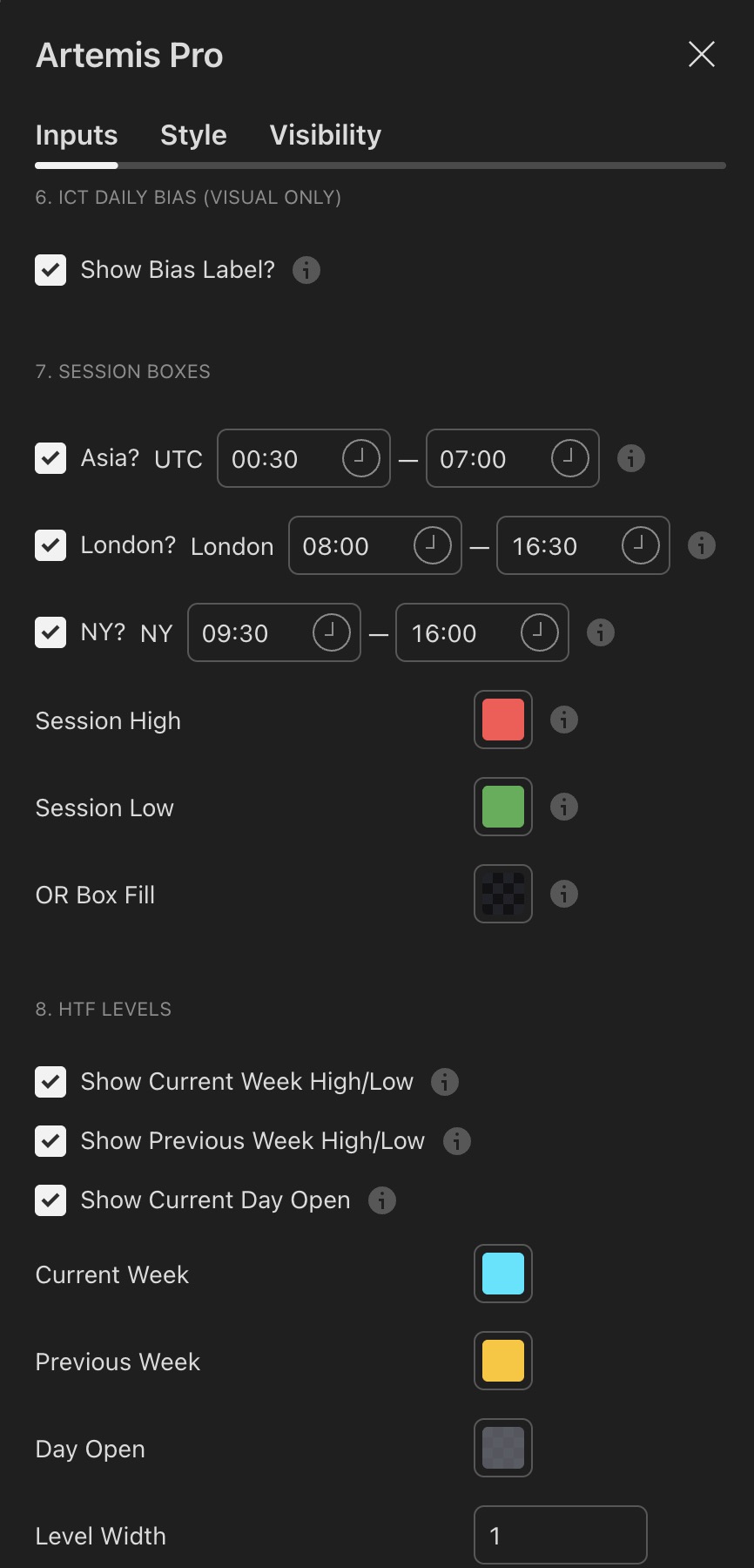
Indicator settings showing the Session Boxes group with per-session toggles, inline time windows and time zones, and the HTF Levels group below
Visual referenceSession Boxes and HTF Levels groups

The session toggles with their inline time-window fields, each labeled with its fixed time zone, followed by the session high and low colors and the opening-range box fill.

Below them sit the HTF level inputs: the three level toggles, the colors for the current week, previous week, and day open, and the two line-width controls.

InputDefaultEffect
Asia?onShow the Asia session
Asia window0030-0700, UTCSession window for Asia
London?onShow the London session
London window0800-1630, Europe/LondonSession window for the London session
NY?onShow the New York session
NY window0930-1600, America/New_YorkSession window for New York
Session High#FF5252Color of the session high line (first-hour opening range high)
Session Low#4CAF50Color of the session low line (first-hour opening range low)
OR Box FillGray, 85 percent transparentFill color of the first-hour opening range box

The same group holds the New York after-hours extension: a toggle for the projection and its own window, 1600-1700 in America/New_York by default. It extends the New York opening range high and low as dotted lines past the close — see Session Boxes.

Session windows travel with their time zones

In the settings dialog, each session's time window field appears inline next to its toggle, labeled with the session's time zone. The session strings assume markets with meaningful Asia, London, and New York activity. If you trade an instrument with different hours, adjust the windows here — see Supported Markets And Charts.

7. HTF Levels

The higher timeframe reference levels. Details in HTF Levels.

InputDefaultEffect
Show Current Week High/LowonCWH and CWL lines
Show Previous Week High/LowonPWH and PWL lines
Show Current Day OpenonCDO line
Current WeekCyan #00E5FFColor for CWH/CWL
Previous WeekAmber #FFC400Color for PWH/PWL
Day OpenGray, 30 percent transparentColor for CDO
Level Width1Line width for the week levels (1 to 4)
Day Open Width1Line width for the CDO line (1 to 4)

8. HTF Candles

Four independent higher timeframe slots, each rendered as mini-candles to the right of price with the same pattern coloring as the main chart. Details in HTF Candles. All four slots share the same input layout:

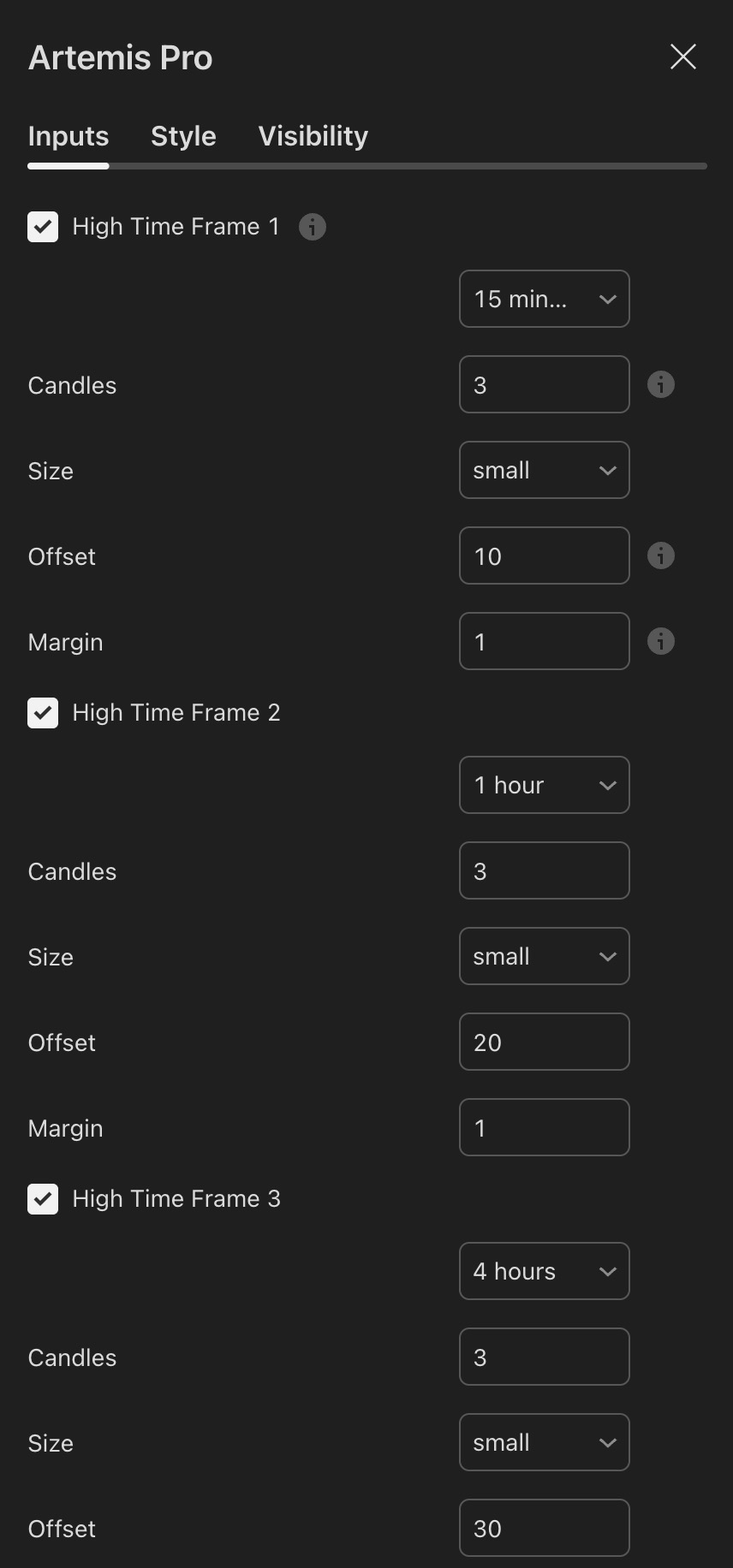
Indicator settings showing High Time Frame slots 1 to 3 with timeframe, candles, size, offset, and margin inputs
Visual referenceHTF candle slots at their defaults

The first three HTF candle slots at their defaults — 15 minutes, 1 hour, and 4 hours — each rendering three small mini-candles.

Every slot carries the same five inputs: timeframe, candle count, size, offset from the right chart edge, and margin between candles. The offsets of 10, 20, and 30 bars step the groups away from live price.

InputDefault (slot 1 / 2 / 3 / 4)Effect
High Time Frame 1-4on / on / on / offEnables the slot
Timeframe15m / 1h / 4h / DailyThe higher timeframe this slot renders
Candles3Number of mini-candles shown (1 to 10)
SizesmallMini-candle size: tiny, small, medium, or large
Offset10 / 20 / 30 / 40Distance from the right chart edge, in bars
Margin1Spacing between the individual mini-candles

9. HTF Info Table

The live table summarizing every enabled higher timeframe. Details in HTF Info Table.

InputDefaultEffect
Show HTF Info Table?onMaster switch for the table
Table Positiontop_rightScreen anchor: top_right, top_left, bottom_right, bottom_left, top_center, or bottom_center
Background#1E1E1ETable background color
Text Color#FFFFFFTable text color