ChartMystic
  • How it works
  • Products
  • Live demo
  • Results
  • Pricing
  • Docs
Log inSign up
  • How it works
  • Products
  • Live demo
  • Results
  • Pricing
  • Docs
  • Log in

Documentation

Artemis Pro

InstallationOverviewHow Artemis Pro ThinksReading The ChartTrend EngineSignal ReferenceLiquidity LinesLiquidity GrabsSession BoxesHTF LevelsHTF CandlesHTF Info TableBacktesting And Data WindowSupported Markets And ChartsSettings ReferenceFAQGlossary

Scribe Studio

OverviewAsk for a StrategyPerformanceTrade AnalysisCodeTweaking Your StrategyTransfer to TradingViewThe Strategy LibraryHistory & Saved StrategiesFAQGlossary
ChartMystic
Documentation/Scribe Studio/Tweaking Your Strategy

Tweaking Your Strategy

Change a strategy's settings, run it again, and read exactly what moved.

Tweak changes the numbers in a strategy and runs a fresh backtest with them: an indicator length, a level, the stop distance, the commission, the position size. It does not add or remove rules. For a different rule, describe a new strategy in the chat.

Opening the Editor

Press Tweak in the actions row. The editor opens beneath the action buttons, right under the strategy it edits. Press Tweak again, or the ×, to close it.

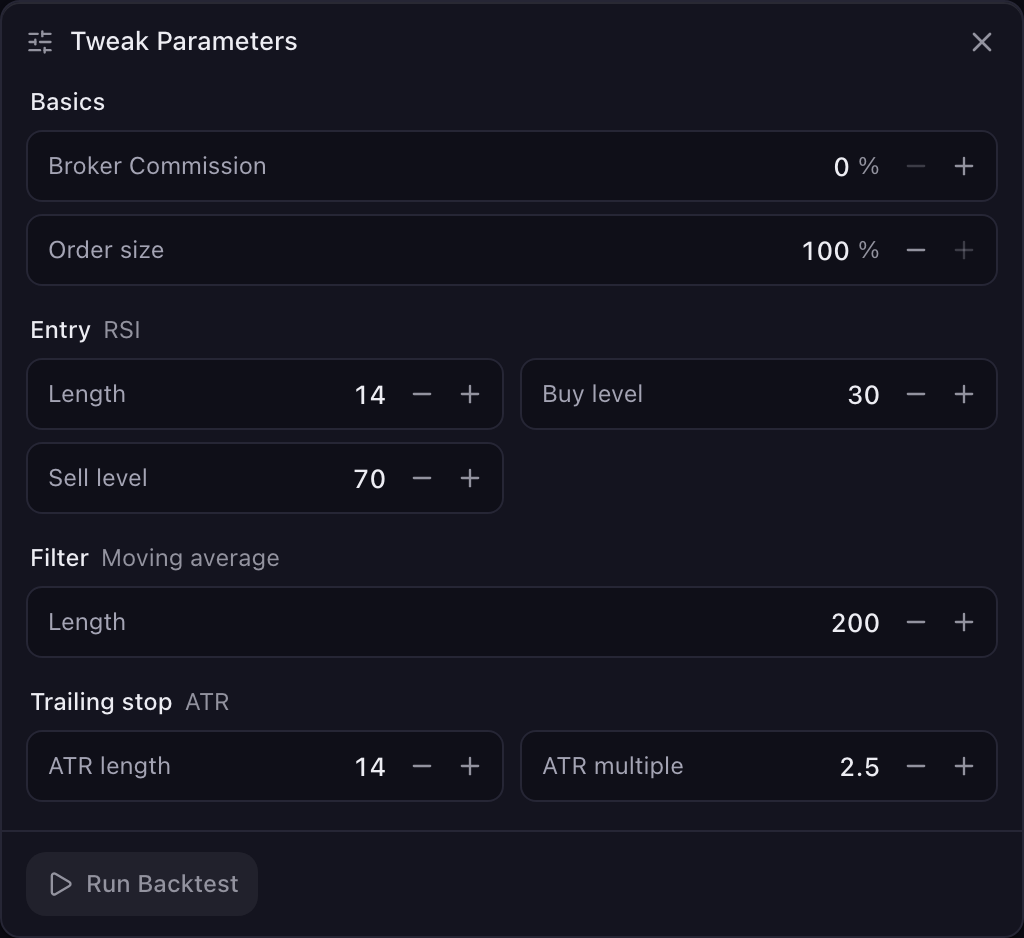
The Tweak editor open under the actions row: Basics, then the strategy's settings grouped as Entry, Filter and Trailing stop, with Run Backtest
Visual referenceThe Tweak editor

The editor opens seeded with the run's own values. Change one or more fields, then press Run Backtest. Reset puts every field back to where it opened.

Basics

Two settings about the run itself.

  • Broker Commission. Percent charged per side of each trade. Opens on the rate this run was tested at. 0 to 5%.
PreviousCodeNextTransfer to TradingView

Need help?

  • Order size. Percent of the account committed on each entry. Opens on what this run used, 100% unless the panel says otherwise. 1 to 100%.
  • There is no separate risk-per-trade setting: what a losing trade costs follows from these two and the stop. With 100% of the account in a trade and a 3% stop, a stopped-out trade loses about 3% of the account; at 50% order size, about 1.5%.

    Strategy Settings

    Below Basics come the strategy's own settings, grouped by the job they do: Entry, Filter, Long exit or Short exit, Trailing stop or Stop loss, Take profit, and Time exit. Each group is named with what it uses, such as Entry MACD or Stop loss Percent, so the fields inside it keep short names: under Entry MACD, "Fast length" is the MACD fast length. Which groups appear depends on the strategy's rules, and this is not a comprehensive list of everything you might see. These are the ones that come up most often:

    Group and fieldWhat it controlsRange
    Entry RSI: LengthLookback for the RSI2 to 100
    Entry RSI: Buy level / Sell levelThe level RSI crosses up through for a long, or down through for a short1 to 99
    Entry MACD: Fast length / Slow length / Signal lengthThe three MACD lengths2 to 50 / 5 to 200 / 2 to 50
    Entry Stochastic: LengthLookback for the stochastic2 to 100
    Entry Stochastic: Buy level / Sell levelThe level %K crosses1 to 99
    Entry EMA crossover: Fast EMA / Slow EMAThe two averages that cross2 to 200 / 2 to 1000
    Filter Moving average: LengthOnly trade on the right side of this average2 to 1000
    Filter ADX: Length / ThresholdOnly trade when trend strength is above the threshold2 to 100 / 1 to 99
    Entry Bollinger Bands: Length / WidthBand lookback and multiplier2 to 100 / 0.1 to 20
    Entry Breakout: LookbackBars for the highest-high or lowest-low breakout2 to 500
    Entry Rate of change: Length / ThresholdRate-of-change lookback and the level it crosses2 to 100 / 0 to 50
    Entry Liquidity sweep: LookbackBars for the sweep-and-reclaim level2 to 200
    Entry Swing sweep: Pivot strengthBars either side that confirm a swing high or low2 to 50
    Filter Volume: Length / MultipleOnly trade when volume is this many times its average2 to 200 / 0.1 to 20
    Trailing stop ATR: ATR length / ATR multipleThe trailing stop's ATR lookback, and how many ATRs it sits behind price1 to 200 / 0.1 to 10
    Stop loss ATR: ATR length / ATR multipleA fixed stop sized in ATRs from the entry1 to 200 / 0.1 to 10
    Stop loss Percent: DistanceA fixed stop this far from the entry0.1 to 50%
    Stop loss Swing point: Pivot strengthThe stop sits at the last confirmed swing low or high1 to 50
    Stop loss Recent bars: LookbackThe stop sits at the lowest low or highest high of these bars1 to 200
    Take profit ATR: ATR length / ATR multipleTake profit this many ATRs from the entry1 to 200 / 0.1 to 10
    Take profit Percent: DistanceTake profit this far from the entry0.1 to 1000%
    Take profit Risk multiple: R multipleTake profit at this multiple of the distance to the stop0.1 to 20
    Time exit: Max bars heldClose a trade still open after this many bars1 to 1000
    Long exit or Short exitThe same fields as the matching entry, for the rule that closes the tradeas the entry

    A rule that appears on both sides of a long-and-short strategy with the same value shows as one field and changes both sides together. Mirrored levels, such as an RSI buy level of 30 and a sell level of 70, stay as two fields in the same Entry group. When the two sides use different rules, they get their own groups: Long entry and Short entry. When both sides use the same rule with a different value, such as an RSI length of 14 for longs and 21 for shorts, the two fields read Length (long) and Length (short), and the chat's re-run note names them the same way.

    Editing

    Type a value, or use the − and + buttons beside it (hold to repeat). Click anywhere on a field's row to start typing. On a keyboard: ↑ and ↓ step the value, Shift or PageUp and PageDown step by more, Home and End jump to the limits, and Enter runs.

    A changed field is highlighted and shows the value it opened with, struck through, next to the new one. Click that old value to put just that field back, or press Reset to put every field back to the run's own values.

    If a value can't be run, the field says why ("Min 2", "Max 50", "Whole number" for a fraction where bars are counted, "Required" for an empty field) and Run Backtest stays disabled. When you leave the field, it moves to the nearest allowed value: an out-of-range number goes to the limit, a fraction in a field that counts bars rounds to a whole number, and an emptied field returns to the value it held before you started editing it. Pressing Enter on such a field corrects it instead of running, so a run never uses a number you have not seen. Run Backtest also stays disabled until at least one value differs from the original, and while another run is in progress.

    Change one thing at a time

    For a first comparison, move a single field, such as an RSI length from 14 to 20. You can see what that change did without having to untangle several edits. A strategy that only improves when three things move at once is usually a strategy fitted to the past.

    Running

    Press Run Backtest. A pill in the chat records what you changed ("TSLA · 1h RSI length 14 → 20 Re-run"), the tracker runs, and the result arrives as a new run in the panel. The original stays in the Strategy History dropdown, so you can flip between the two.

    The new summary leads with the outcome of your change: "Your change moved net profit from +142% to +156%." A worse outcome is reported exactly like a better one. If you changed the commission or the order size, a note beneath says the two runs are not like-for-like and names both settings.

    A re-run is a new run, not an overwrite. Press Favorite on whichever version you want to keep; a saved strategy is never changed by a later tweak.

    A failed re-run shows an error card with a Retry that repeats the same attempt as a new run.

    What Can't Be Tweaked

    If the editor says "Some of this strategy's conditions were custom-built and can't be edited here", part of the strategy was written specially for a request and has no adjustable settings. A strategy with more than one filter exposes only the first. To change direction, swap an entry rule, or edit anything that is not in the editor, describe the strategy you want as a new request in the chat; include the market, timeframe, direction, entry, filters and exit so the new test uses exactly the idea you intend.

    Trying Another Market

    To keep the settings and change the market instead, use Portfolio Backtest in the actions row. Performance covers it.