

Footprint Precision Mode
Refine pressure and acceptance with TradingView footprint data when it is available.
TradingView Premium is required
Footprint data is only made available to users on a TradingView Premium plan. This is a restriction TradingView places on the underlying order-flow data — it is outside ChartMystic's control. If you enable Footprint Precision Mode without TradingView Premium, Atlas Pro will fail to load on your chart because TradingView blocks footprint data access entirely on lower tiers.
If the script stops loading after you enable Footprint Precision Mode, open the settings, toggle the option back off, and reload the chart. Atlas Pro will resume normal operation immediately.
Footprint Precision Mode upgrades how Atlas Pro reads pressure and acceptance by feeding intrabar order-flow detail into the scoring layers. When it is active, the engine sees what is happening inside each candle, not just the candle's totals — and that finer view tightens the conviction behind every read it publishes.
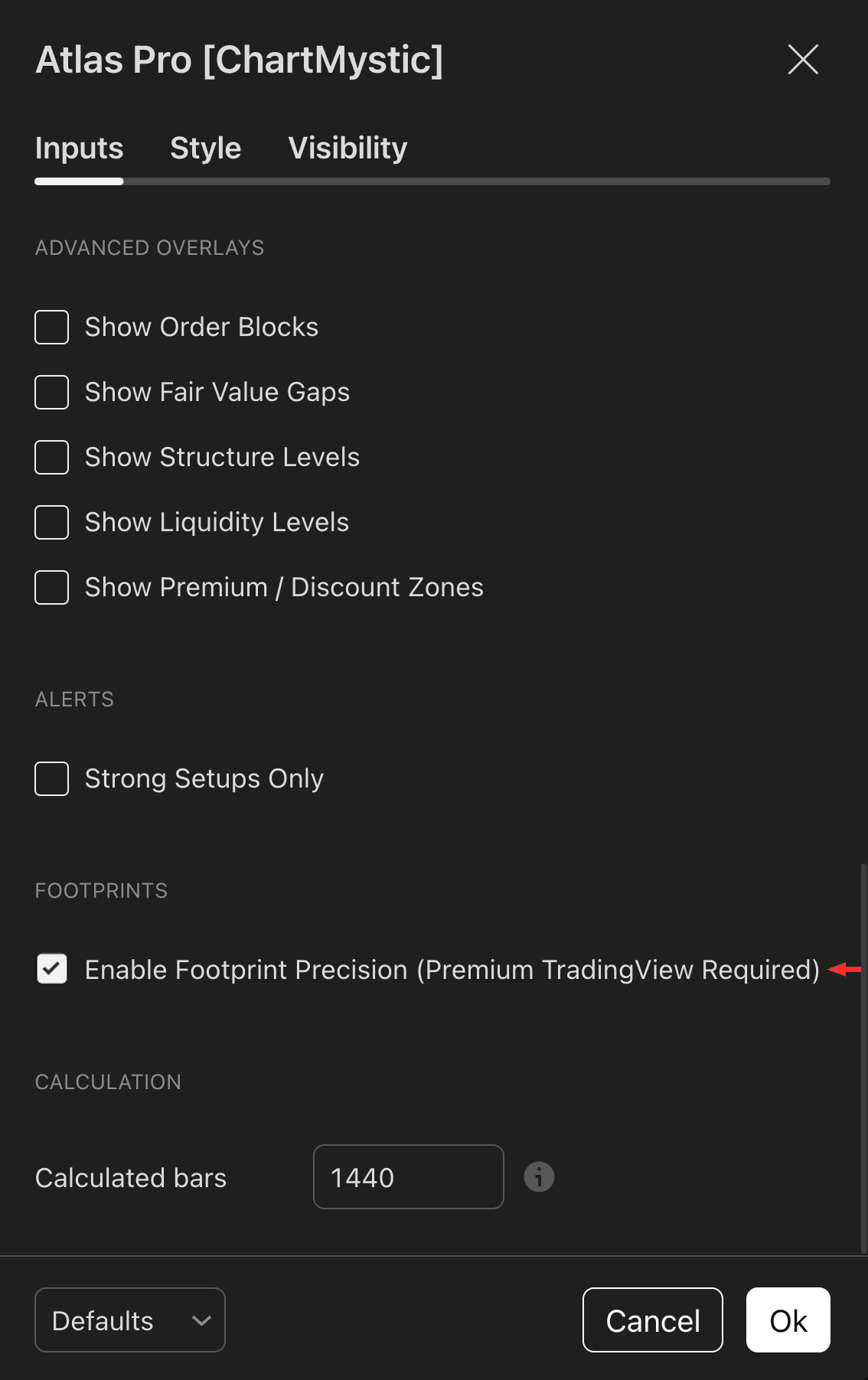
Toggle Enable Footprint Precision under the Footprints section to opt into precision mode, which lets Atlas Pro consume per-bar footprint data when reading order flow.
The option only takes effect on a TradingView plan that exposes footprint data — typically TradingView Premium. If your plan does not support it, the toggle has no visible effect.
What TradingView Footprint Data Is
A normal candle is a summary: open, high, low, close, and one volume number for the entire bar. That single volume figure tells you how much traded — but not where inside the bar it traded, or who was driving it. Two candles with identical OHLC and identical total volume can mean completely different things if the participation underneath them was different.
TradingView's footprint data unpacks that summary. Instead of one volume number per bar, footprint data exposes volume broken down by price level inside the bar, with each price level split into buy-side and sell-side activity. That extra resolution gives every candle three pieces of information that summary candles cannot:
- Delta. The net difference between buy-side and sell-side volume on a bar. Positive delta on a bullish push means buyers were aggressive; negative delta on the same push is a warning sign that the move is happening on absorption, not initiative.
- Point of Control (POC). The single price level inside the bar (or session) where the most volume transacted. Price holding above the POC on a bullish setup is structurally bullish behavior.
- Value Area (VAH/VAL). The price range containing roughly 70% of the session's volume. Value-area boundaries act as soft support and resistance — acceptance inside or beyond value tells you whether the auction is shifting.
This is granular order-flow detail that summary candles simply cannot show. TradingView gates it behind the Premium tier because it requires substantially more data per bar.
How Atlas Pro Uses Footprint Data
When Footprint Precision is active, Atlas Pro feeds delta, POC, and value-area references into its existing pressure and acceptance scoring on setups that have already cleared the context and trigger gates. Footprint never creates its own trigger or signal — it sharpens reads the base engine already produced.
The practical effect: setups that the base engine would have shown as Building upgrade to Strong when the order-flow detail confirms genuine participation, and setups that look clean from candle summary alone can downgrade to Weak when the footprint reveals absorption rather than initiative.
What footprint changes in your reads
Without footprint. A clean bullish trigger prints. Atlas Pro can only see total candle volume, so the dashboard shows acceptance as Building — the move is honored, but the engine cannot confirm internal participation.
With footprint active. The same trigger upgrades to Strong because the engine now sees that price held the value area on positive delta with buy-side volume share dominating. The thesis is the same; the conviction is higher.
The Dashboard Tells You What Footprint Is Doing
When Footprint Precision Mode is enabled and your TradingView plan supports it, the Expanded dashboard surfaces a Footprints row reporting one of three states.
| State | Meaning |
|---|---|
| Enabled | The setting is on, but footprint detail is not currently shifting the read. Base engine output is unchanged. |
| Active | TradingView is providing footprint data and Atlas Pro is using it to refine the current pressure and acceptance scoring. |
| Fallback | Footprint data was requested but unavailable on this specific symbol or timeframe even though your plan supports it. The base engine continues to run normally. |
Read the row to audit exactly when footprint is contributing to the current chart. If you see Fallback consistently on a symbol, the symbol's data feed on that timeframe does not provide footprint detail — turn the setting off for that chart.
When To Enable It
Enable when
You already understand the base Atlas Pro workflow, you have TradingView Premium, and you want a finer participation read on setups that have already cleared context and trigger.
Leave it off when
You are still learning the base Atlas Pro read, your TradingView plan is below Premium, or your symbols and timeframes do not have footprint data available.