

Multi-Timeframe Dashboard
Use selected timeframe rows to compare Atlas Pro reads without leaving the chart.
The Multi-Timeframe Dashboard surfaces Atlas Pro reads from several timeframes inside the dashboard you are already looking at. It is useful when your workflow depends on alignment between the chart timeframe and timeframes above or below it.
Markets are fractal. A lower-timeframe move can be a complete setup for a scalper and only a small pullback on a higher timeframe. The MTF Dashboard keeps that perspective visible without forcing you to flip between charts.
Each enabled slot runs the full Atlas Pro engine on its own timeframe and publishes a real bias and confidence — not a lightweight proxy. From here on, the docs use MTF for short.
Alignment is context, not a requirement
MTF rows help you compare chart states. They are not a requirement that every timeframe must agree before a setup can matter. Demanding perfect alignment is the fastest way to miss every transition — a 15m flip ahead of a 4h flip is often the early read on that transition, not a reason to ignore the 15m.
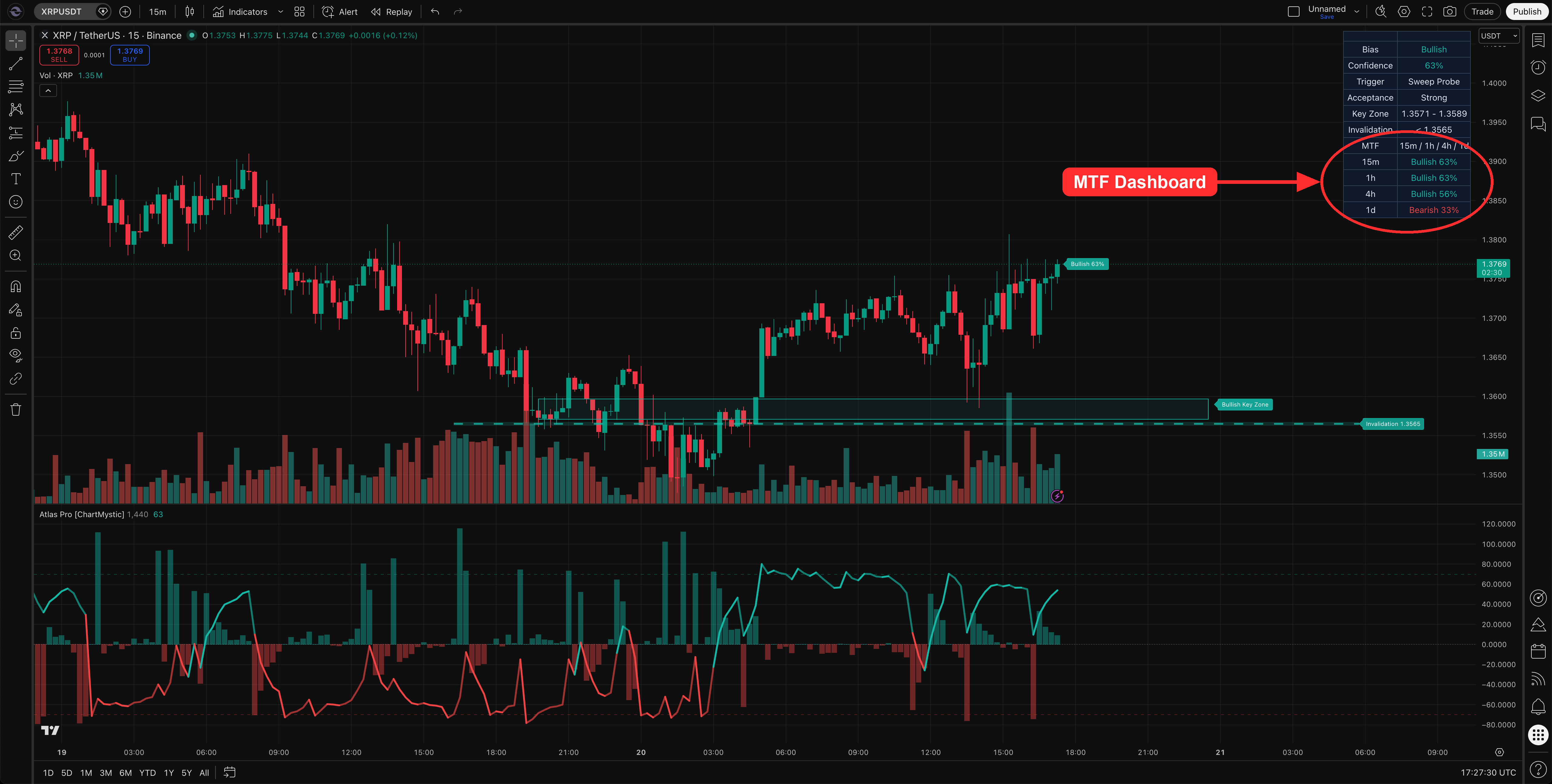
The MTF Dashboard adds multi-timeframe rows to the bottom of the dashboard so you can read the bias on several timeframes at a glance.
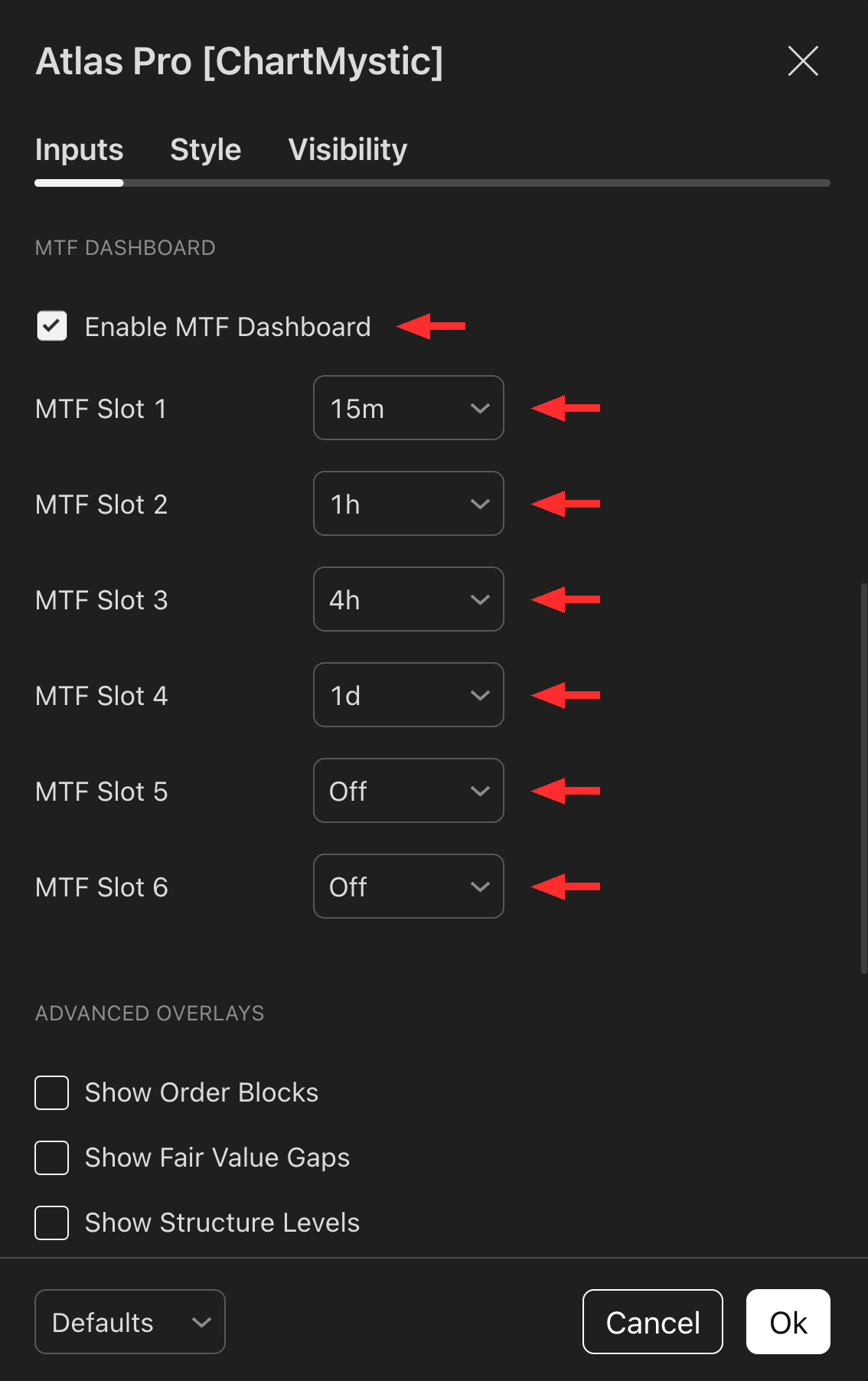
Toggle Enable MTF Dashboard in the MTF Dashboard section to turn it on, then set the MTF Slot 1–Slot 6 dropdowns to the timeframes you want compared. Atlas Pro evaluates each slot independently and renders one row per slot.
Default Timeframe Ladder
| Slot | Default | Recommended use |
|---|---|---|
| Slot 1 | 15m | Working timeframe for intraday |
| Slot 2 | 1h | Near-term swing context |
| Slot 3 | 4h | Higher-timeframe alignment |
| Slot 4 | 1d | Macro context |
| Slot 5 | Off | Extend down (e.g., 5m) for scalping |
| Slot 6 | Off | Extend up (e.g., 1w) for swing-to-position |
Each slot can be reassigned to another supported timeframe or switched off.
How To Read MTF Rows
The MTF header lists the active slots. Each row shows the timeframe and that timeframe's Atlas Pro read.
| Row value | Meaning |
|---|---|
Bullish 72% | That timeframe currently supports a bullish read with 72% confidence. |
Bearish 68% | That timeframe currently supports a bearish read with 68% confidence. |
0% | The slot is neutral, not ready, or not publishing a directional read. |
How To Use MTF Alignment
A simple framework:
- Chart timeframe and higher timeframes agree → cleaner context for the setup.
- Chart timeframe conflicts with higher timeframes → setup deserves more caution.
- Lower timeframes shift before higher ones → the market may be transitioning, not yet confirmed at the broader level.
Example MTF Reads
Chart is 15m, the 1h and 4h rows agree with the chart: the lower-timeframe setup has broader support.
The 15m row flips while the 4h row stays opposite: you may be seeing a lower-timeframe transition inside a larger opposing structure.
The 15m, 1h, and 4h rows are mixed: reduce the pressure to act immediately. Mixed timeframe context usually means the chart needs more development.
Choosing Timeframes
Choose timeframes based on how you trade.
For intraday workflows, compare the chart timeframe with 15m, 1h, and 4h. For swing workflows, lean on 1h, 4h, 1d, and 1w.
Avoid adding timeframes just because the slots are available. Too many rows create hesitation, not clarity.