

Overview
A high-level tour of Atlas Pro and the core workflow it brings to TradingView.
Atlas Pro is a premium TradingView indicator that collapses market context into one dominant side, one confidence percentage, and one active thesis. Instead of stacking unrelated tools that argue with each other, the engine resolves them into a single decision-ready read at the front of every chart.
You stop interpreting widgets and start working a reading order: current direction, current confidence, the trigger that brought the setup into focus, whether the market is accepting it, and the zone the thesis is leaning on.
Core Outputs
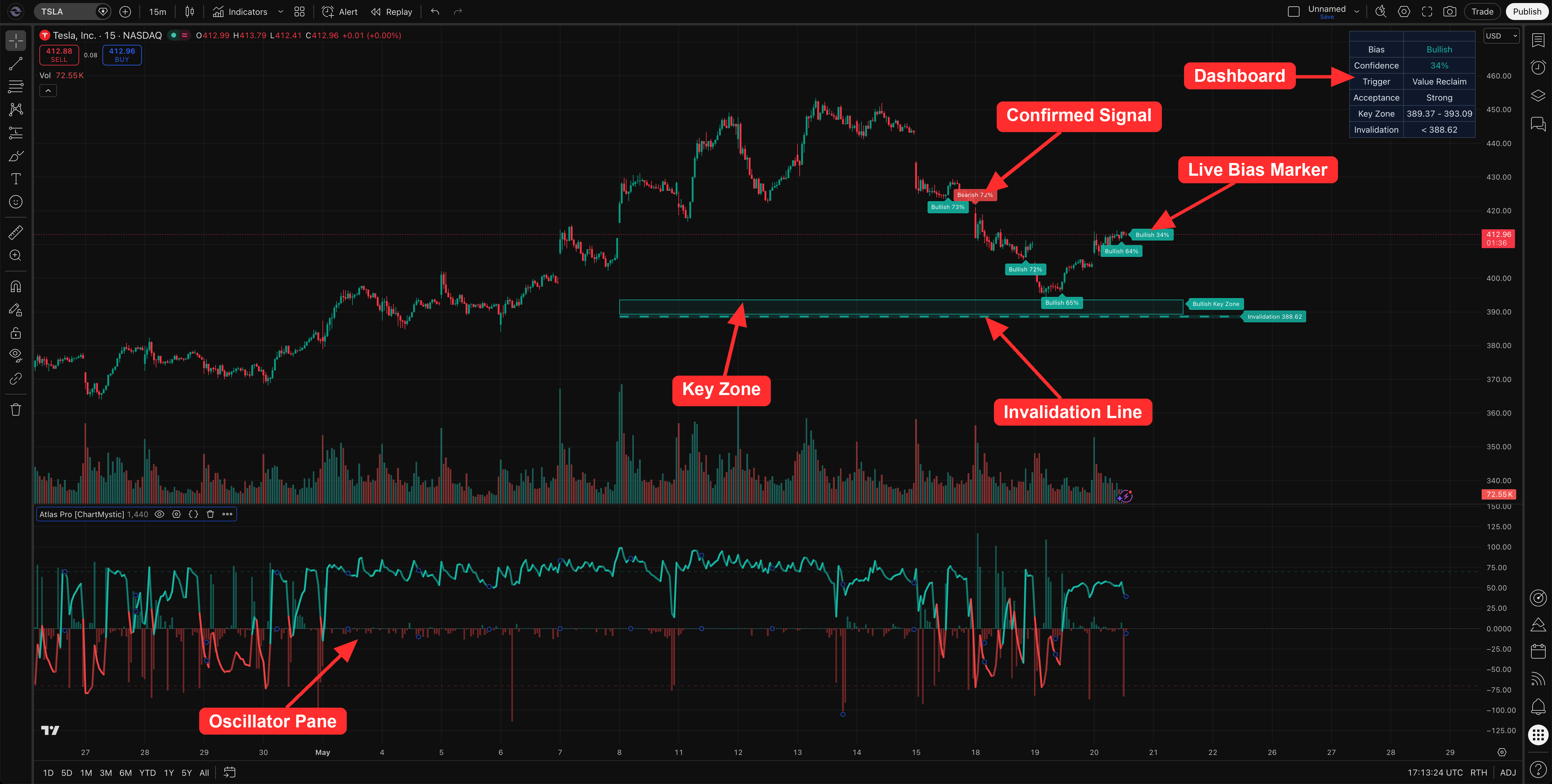
Six marquee outputs do the bulk of the work. Everything else in the docs is detail behind these.
Live Bias Marker
A persistent label near current price that prints the engine's front-edge read as Bullish XX% or Bearish XX%. Updates intrabar by design.
Confirmed Signals
Closed-bar markers that print only after the active Signal Mode gate, release spacing, and rearm rules have cleared.
Dashboard
A small on-chart panel that surfaces direction, confidence, trigger, and acceptance, with optional diagnostic and overlay rows.
Atlas Pro Oscillator
A dedicated pane showing the signed bias on a −100 to +100 scale with a buildup histogram for pressure development over time.
Key Zone + Invalidation Line
Two on-chart references tied to the active confirmed setup: the area the thesis is leaning on, and the level that breaks it.
Confirmed-Signal Alerts
Webhook-friendly alerts that fire when a new confirmed marker prints, with ticker, timeframe, side, confidence, trigger, and acceptance in the payload.
The rest — Multi-Timeframe Dashboard, advanced overlays (Order Blocks, FVG, Structure, Liquidity, Premium/Discount), Pine Screener Integration, and Footprint Precision Mode — lives in its own dedicated section and stays off by default.
What The Current Directional Read Means
The current directional read is Atlas Pro's live interpretation of the chart. It tells you which side currently has stronger evidence inside the engine.
It is not a confirmed signal. The current read can update while the bar is still forming — that is the intended realtime behavior of the Live Bias Marker.
What A Confirmed Signal Means
A confirmed signal is a closed-bar marker. It appears only after the bar has closed and Atlas Pro has cleared the active Signal Mode's confirmation rules.
Confirmed signals are designed to be stable. Once a confirmed marker is placed, it stays anchored to its signal bar and does not move.
How To Use Atlas Pro
Treat Atlas Pro as a reading order, not a pile of widgets.
- Read the Live Bias Marker for the current direction and confidence.
- Wait for a confirmed marker when your workflow requires closed-bar confirmation.
- Use the Dashboard's Trigger and Acceptance rows to judge why the setup is being taken seriously.
- Use the Key Zone and Invalidation Line as the chart references for the active setup.
- Add MTF, alerts, Pine Screener, overlays, or Footprint only when they answer a specific question.
A cleaner first pass
Read direction, check confidence, locate the Key Zone, respect the Invalidation Line, then decide whether you need more context. Optional overlays should clarify the chart, not crowd it.
One side. One percentage. One thesis.
Atlas Pro collapses dozens of competing signals into a single decisive directional read. That is the entire product philosophy — and every other section of the docs is downstream of it.
What Atlas Pro Is Not
Atlas Pro is not financial advice, not an automated execution system, and not a guarantee of profit. It does not remove the need for risk management, market awareness, or personal review.
Use it as a structured decision-support tool. It organizes the chart. It does not replace your trading plan.